|
|
m1nd7r1p McG33
·
Aug 9, 2017
·
Denver, CO
· Joined Jun 2014
· Points: 0
2) Please allow the screen to rotate, especially when viewing pictures, and most especially allow zooming/enlarging pictures. When I take my phone to the crag and rely on MP, I need the images to be bigger to identify features or follow a multi-pitch route line. I can zoom in with two fingers, but the moment I remove them from the screen the picture snaps back to original size.
|
|
|
Matt Brand
·
Aug 19, 2017
·
Unknown Hometown
· Joined May 2017
· Points: 0
I'm hoping that some of these things will be addressed with a newer release, as previously mentioned, but here is a short list of much needed repairs: 1. Bookmarks for areas, specifically accessible from the home page. Otherwise we end up spending a lot of unnecessary time clicking through the areas lists to get to the information we need when out at the route, or trying to get there. 2. Being able to download areas, as you used to, so that you can access them while out there. This has already been mentioned, and I can't emphasize enough how important this is. Just wanted to reiterate these points so the developers can prioritize what to work on. Thanks!
|
|
|
Josh Janes
 ·
Aug 31, 2017
·
Unknown Hometown
· Joined Jun 2001
· Points: 10,294
·
Aug 31, 2017
·
Unknown Hometown
· Joined Jun 2001
· Points: 10,294
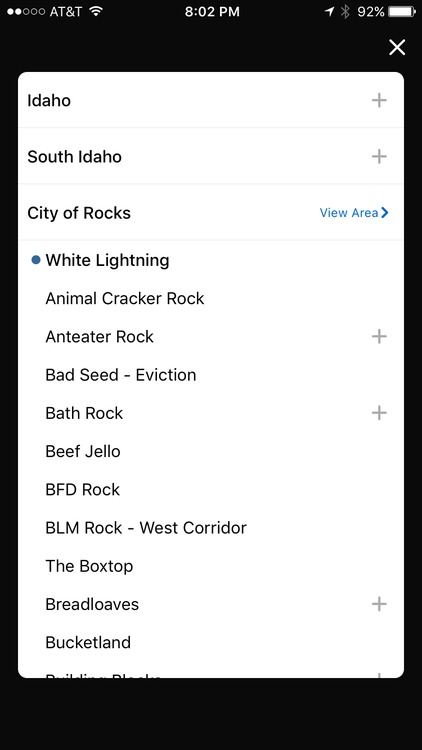
This screenshot shows how the app indicates the area I'm currently viewing with a little blue dot. That's great. But it also moves that area to the top of the list... and out of alphabetical order. I find this to be annoying. Can we keep things in alphabetical order? If the little blue dot isn't enough, perhaps bold or highlight the text as well.
|
|
|
Parker Wrozek
·
Sep 1, 2017
·
Denver, CO
· Joined Mar 2012
· Points: 86
Just got the new app pushed on android. Now to go figure out what all I had downloaded... slick app overall. Seems a bit easier to navigate than the old one. A question though, is there a way to download all the photos for an area? I used to just grab all the info for an area I was headed to cover any possibility but it looks like you have to go all the way to the route level to get those photos which seems kind of pointless.
|
|
|
Noah Yetter
·
Sep 2, 2017
·
Lakewood, CO
· Joined Jul 2015
· Points: 105
Really dig the new app. Echoing Parker's feedback, it looks like the "download all photos" function went missing... Also maybe I'm missing it but it looks like there isn't a way to download less than a whole state? Used to be able to download e.g. Joshua Tree without getting the rest of California (which is huge).
|
|
|
Jay Eggleston
·
Sep 2, 2017
·
Denver
· Joined Feb 2003
· Points: 21,889
The new app won't update for me anymore. It gets to about 70% downloaded and then shuts the app off.
|
|
|
FrankPS
·
Sep 2, 2017
·
Atascadero, CA
· Joined Nov 2009
· Points: 276
Noah Yetter wrote: Also maybe I'm missing it but it looks like there isn't a way to download less than a whole state? Used to be able to download e.g. Joshua Tree without getting the rest of California (which is huge).
Correct, you must download California to view any area within it (on an Android, anyway; don't know about Iphones).
|
|
|
BJ Sbarra
·
Sep 2, 2017
·
Carbondale, CO
· Joined Aug 2006
· Points: 671
I'll add another voice to the people who want to be able to only download a specific area (like we used to) instead of the entire state. It was so simple before, this version feels like a big step back in terms of usability compared to the previous version. Wish I hadn't upgraded...
|
|
|
Jay Eggleston
·
Sep 5, 2017
·
Denver
· Joined Feb 2003
· Points: 21,889
I deleted and reloaded the app and it still shuts off after only partially downloading. Needs to be fixed...
|
|
|
jtwalter
·
Sep 6, 2017
·
Orem, UT
· Joined Jun 2006
· Points: 806
It would be nice to have a setting that allowed users to pick the folder on the device to use for downloaded information. I'd like to be able to use my micro SD card for storage rather than my device storage. How do you update the downloaded areas? My data is showing "Data from Mar 28, 2017" and I updated the app just this weekend.
|
|
|
Marco Dees
·
Sep 6, 2017
·
New Paltz
· Joined Dec 2013
· Points: 50
|
|
|
Aleks Zebastian
·
Sep 6, 2017
·
Boulder, CO
· Joined Jul 2014
· Points: 175
climbing friend, it would be quite nice yes to have a setting where you may swipe left or right on the climbing photos of the others to indicate whether you would like pursue them relationship of romantic climbing type, and discover whether they are impressed by your sculpted guns, chiseled abs, stunning features, fine layer of neck meat, and bold flash.
|
|
|
rocknice2
·
Sep 6, 2017
·
Montreal, QC
· Joined Nov 2006
· Points: 3,847
jtwalter wrote:It would be nice to have a setting that allowed users to pick the folder on the device to use for downloaded information. I'd like to be able to use my micro SD card for storage rather than my device storage. How do you update the downloaded areas? My data is showing "Data from Mar 28, 2017" and I updated the app just this weekend. I'm able to save data on my sd card. Setting is switched under apps settings.
|
|
|
Marc801 C
·
Sep 6, 2017
·
Sandy, Utah
· Joined Feb 2014
· Points: 65
rocknice2 wrote:I'm able to save data on my sd card. Setting is switched under apps settings. Not all devices are able to accept an sd or micro-SD card, so the ability to limit to specific areas is still needed.
|
|
|
rocknice2
·
Sep 6, 2017
·
Montreal, QC
· Joined Nov 2006
· Points: 3,847
Marc801 C wrote:Not all devices are able to accept an sd or micro-SD card, so the ability to limit to specific areas is still needed. Why would you want to select a specific folder? If you don't have an SD card then it goes to the device regardless of which folder it's in.
|
|
|
Marc801 C
·
Sep 7, 2017
·
Sandy, Utah
· Joined Feb 2014
· Points: 65
rocknice2 wrote:Why would you want to select a specific folder? If you don't have an SD card then it goes to the device regardless of which folder it's in. Huh? Who said anything about folders?
|
|
|
rocknice2
·
Sep 7, 2017
·
Montreal, QC
· Joined Nov 2006
· Points: 3,847
HUH? What specific areas are you talking about.
|
|
|
Marc801 C
·
Sep 7, 2017
·
Sandy, Utah
· Joined Feb 2014
· Points: 65
rocknice2 wrote:HUH? What specific areas are you talking about. *Any* specific climbing area instead of the entire state - The Needles, not all of California; Zion NP, not all of Utah. Can't download to an SD drive since iPhones do not have an SD or micro SD slot and I have a 16G 5s, so space is now at a premium. (Yes, there are aftermarket options, but a misbehaving app should not be the driver of purchasing something non-standard for the device.)
|
|
|
Jay Eggleston
·
Sep 9, 2017
·
Denver
· Joined Feb 2003
· Points: 21,889
The app still won't update correctly. It gets to about 80% and then shuts off. Please fix this!!!
|
|
|
Ryan Underwood
·
Sep 9, 2017
·
Laguna Hills, CA
· Joined Sep 2015
· Points: 55
I have the old app on my samsung tablet and I love it. The old works so well. My biggest issue with the new one is when navigating areas. I press back on my iphone and instead of taking me back one step, I have to re-search for the route/area from the beginning of the state lol. 70% of the time I forget and press it.
Just checked it again, and this time it just keeps taking me back to the same area I was climbing last week. I look up a route, press back to go to the area and keeps taking me to Keller Peak lol.
Also something happened last week up at keller peak with my pictures. I've been there since the update and have had the images downloaded but this time the pictures wouldn't load and a red bar at the bottom kept trying to sync but failed with no reception, leaving us to navigate without them.
|

 Continue with onX Maps
 Sign in with Facebook