Mountain Project Logo

"Where will the weather be good enough to climb this weekend?"

Original Post
Scrawny White Guy in a Yellow Shirt · · San Luis Obispo, CA · Joined Aug 2017 · Points: 367

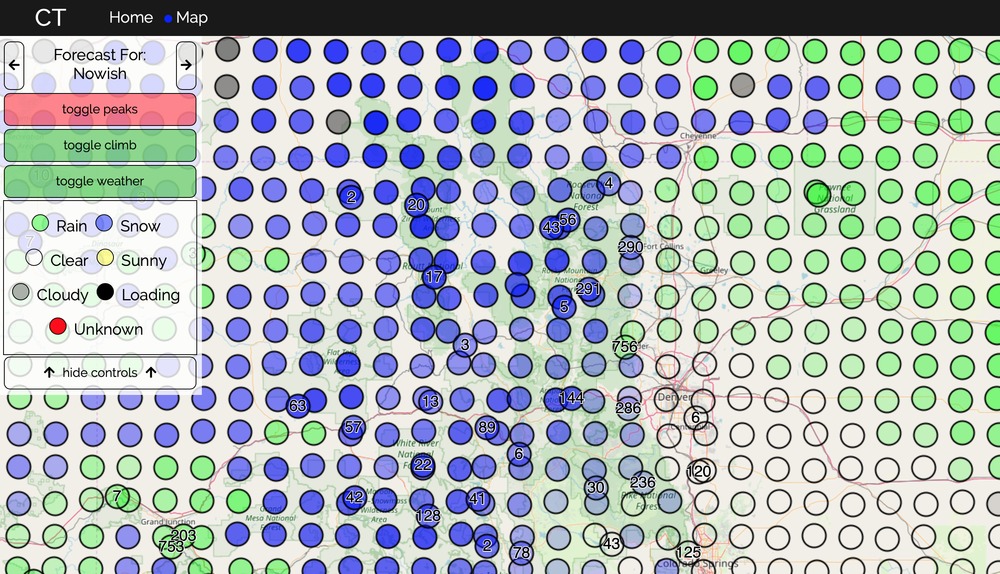
Hey all, I made a tool for myself last week and though it might be useful to others.

Essentially it aims to answer the question: "Where will the weather be good enough to climb this weekend?"

Let me know what you think/what could enhance it.
Sorry to everyone not in the west US, I'll add more states soon, but the peaks are worldwide.
I also should note the weather only extends from the west coast to the eastern Colorado border.
Have fun clicking around the map!

http://climbingtoolbox.com/

Marc801 C · · Sandy, Utah · Joined Feb 2014 · Points: 65
David James wrote: Hey all, I made a tool for myself last week and though it might be useful to others.

Essentially it aims to answer the question: "Where will the weather be good enough to climb this weekend?"
Let me know what you think/what could enhance it.
Sorry to everyone not in the west US, I'll add more states soon, but the peaks are worldwide.
I also should note the weather only extends from the west coast to the eastern Colorado border.
Have fun clicking around the map!

http://climbingtoolbox.com/

So basically you riffed on http://climbingweather.com/

Matt B · · Boulder, CO · Joined Feb 2017 · Points: 492


I like this function.

Also, I really like the saturation/transparency being linked to the percent chance. That's a nice touch.

Also also, I broke it once with the toggle weather on. It went blank from too much data I think...

Scrawny White Guy in a Yellow Shirt · · San Luis Obispo, CA · Joined Aug 2017 · Points: 367
Marc801 C wrote:

So basically you riffed on http://climbingweather.com/


Well not exactly... I honestly didn't know that existed until one of my friends said the same. 

I think the functionality of walking through time on the map and having a direct beta overlay is unique enough.

The aim is to solve a different problem, while climbingweather.com solves the question "what will the weather be at this crag in the future"  and "where can I climb now" my tools aims to answer "what will future weather be like around an area" or "where can I go climb within 3 hours of me this weekend".

I created it because I was tired of having to google every crag in CA to find a dry one. (Annoyed with all this rain, but also stoked that we are finally getting rain). 

Sean Post · · Golden, CO · Joined Apr 2017 · Points: 31

Have you given thought to adding a "wind" status for crags? Always good to avoid sustained 25mph winds at Josh.

Scrawny White Guy in a Yellow Shirt · · San Luis Obispo, CA · Joined Aug 2017 · Points: 367
Sean Post wrote: Have you given thought to adding a "wind" status for crags? Always good to avoid sustained 25mph winds at Josh.

Thats a fantastic idea, I do have all the wind data downloading every day anyway.

Any thoughts on ways to display it on the map? I suppose changing the dots to arrows, or a toggle to change the dots to arrows (in wind direction, scaled by speed).

Paul Bishop · · Bend, OR · Joined Jan 2019 · Points: 0

Traditional weather display is "flags" off of the circle. Small line for <5mph, a small tick off the line for 5mph, large tick for 10mph, etc. See https://www.wunderground.com/wundermap  for an example of what I mean. I think a toggle to show wind (or not) is good; wouldn't want to clutter it up if it wasn't a concern for someone.

Scrawny White Guy in a Yellow Shirt · · San Luis Obispo, CA · Joined Aug 2017 · Points: 367
Paul Bishop wrote: Traditional weather display is "flags" off of the circle. Small line for <5mph, a small tick off the line for 5mph, large tick for 10mph, etc. See https://www.wunderground.com/wundermap  for an example of what I mean. I think a toggle to show wind (or not) is good; wouldn't want to clutter it up if it wasn't a concern for someone.

That's a killer example. I'll for sure implement it like that. Thanks!

Dan Cooksey · · Pink Ford Thunderbird · Joined Jan 2014 · Points: 365

Sweet concept.  I’m not sure what data you have populating the climbing areas but the Washington ones seem a little off.  The names of closest peaks are correct, but there either isn’t climbing there, or a much better suggestion for that area would make sense.

Also for example  Marymoor Park (manufactures outdoor wall) is called “Deleo Wall” which is a hiking trail in a park 15 miles south.

Scrawny White Guy in a Yellow Shirt · · San Luis Obispo, CA · Joined Aug 2017 · Points: 367
Dan Cooksey wrote: Sweet concept.  I’m not sure what data you have populating the climbing areas but the Washington ones seem a little off.  The names of closest peaks are correct, but there either isn’t climbing there, or a much better suggestion for that area would make sense.

Also for example  Marymoor Park (manufactures outdoor wall) is called “Deleo Wall” which is a hiking trail in a park 15 miles south.

I think you're looking at the Summit Post beta checkout the MP tab on the beta popup, I just checked out Marymoor And saw the correct areas populating (Originally from the area and miss the weird man made crags).

slim · · Unknown Hometown · Joined Dec 2004 · Points: 1,093

wow, this is pretty sweet.  thanks for making it!

J P · · Portland, OR · Joined Jan 2016 · Points: 550

YES MAN! Been wishing for something like this for a while, living in an area where 3-4 hour drives on weekends opens up a ton of options. Thank you!!!

Andrew Krajnik · · Plainfield, IL · Joined Jul 2016 · Points: 1,739

Nothing updates for me... I can see/pan/zoom the map, but there's no data overlaid, and the toggle buttons don't change anything on the map. I'm using Google Chrome in Windows 7.

Scrawny White Guy in a Yellow Shirt · · San Luis Obispo, CA · Joined Aug 2017 · Points: 367
Andrew Krajnik wrote: Nothing updates for me... I can see/pan/zoom the map, but there's no data overlaid, and the toggle buttons don't change anything on the map. I'm using Google Chrome in Windows 7.

Huh, that's odd, I tested on Windows 7 and 10. Could be a few things: 

1) make sure you're looking at the West US specifically CO to the Pacific.
2) give it a second to load, especially if zoomed out. It's a good amount of data to load at once.
3) there's a problem on my end and I'll be pulling my hair out looking for it.

Phil Lauffen · · Innsbruck, AT · Joined Jun 2008 · Points: 3,113
Marc801 C wrote:

So basically you riffed on http://climbingweather.com/


This is always the response of the jealous ;)

Cool! Which weather APIs are you hitting? Want any help expanding? I'd like this for Austria.

a d · · Los Angeles, CA · Joined Mar 2010 · Points: 5
David James wrote:

Thats a fantastic idea, I do have all the wind data downloading every day anyway.

Any thoughts on ways to display it on the map? I suppose changing the dots to arrows, or a toggle to change the dots to arrows (in wind direction, scaled by speed).

Perhaps use little arrows to indicate wind direction, such as what Google weather does, and then color the arrows in accordance with wind speed (e.g. red = lots of wind, light blue = breeze)

a d · · Los Angeles, CA · Joined Mar 2010 · Points: 5
Marc801 C wrote:

So basically you riffed on http://climbingweather.com/


How can you even compare this to climbingweather.com?  Far better in many ways, including specific climbing areas shown with MP route listing pop-ups.

Scrawny White Guy in a Yellow Shirt · · San Luis Obispo, CA · Joined Aug 2017 · Points: 367
Phil Lauffen wrote:

This is always the response of the jealous ;)

Cool! Which weather APIs are you hitting? Want any help expanding? I'd like this for Austria.

I'm using api.weather.gov to get all the weather data right now. (Its free which was a huge draw for me). It would be super cool to incorporate other areas of the world, but downloading and normalizing all the data every day would take hours to run.

I'm open to any thoughts on how to optimize the weather grabbing though.
Also if you're interested here is the github : https://github.com/dpjames/climbingToolbox

Be warned I haven't really added comments and the repo is messier than I'd like right now. I'll clean it up this week and properly split up all the files with documentation.

Guideline #1: Don't be a jerk.

General Climbing
Post a Reply to ""Where will the weather be good enough to climb…"

Log In to Reply
Welcome

Join the Community! It's FREE

Already have an account? Login to close this notice.