
 Continue with onX Maps
 Sign in with Facebook






download all photos for an area?

|
Formerly in the app you could select an area and download all photos for the entire area. Now it appears (at least in the case of Indian Creek) that you have to drill down into sub areas or even individual routes to be given the option of downloading photos. Since I don't at this point know exactly which routes or even crags we're going to be visiting, and since there is no web access out there, this reduces the usefulness (previously FAR more useful than the guidebook in my opinion) of the app considerably if I can't work around this issue. Thoughts? |
|
|
I second this. |

|
I'd like to see this option as well. I understand that some areas could be potentially huge downloads, and the app gives you a warning to that effect. I'd like to see an option to ignore the warning and download anyway, if you have the space for it. ("Warning! This area contains 1500 photos, and would require approximately 6Gb of space to download. We recommend you download photos for specific sub-areas instead. Are you sure you wish to proceed?") |
|
|
|
|
|
|
|
|
grog m aka Greg McKee wrote: I own this book and wish I could agree, but as I said the information on mountainproject is dramatically better than Bloom's book. I basically use Bloom to make sure I'm walking towards the right cliff. We generally left it in the car. Rife with errors and question marks, and often near impossible to identify the routes. Unbelievable that this book is in its 3rd edition and still at the level that it is. Mountainproject, on the other hand, has awesome beta photos, great gear recommendations, and ongoing error correction. So I'm going route by route getting the photos at the crags we might hit, which was a one touch operation in the old app.... |
|
|
I think I am having this problem too. On android it looks like the photos downloaded successfully but then when I am offline they are not there. There are getting to be a lot of photos of some popular routes and areas. It would be nice to be able to download just pics of the routes and leave out the pics of summit glory, belay ledge parties, pint glasses, pizza slices, crag dogs, snakes, sunsets, etc. This would probably require users to do a better job of coding the pics as beta or not beta though. |
|
|
Justin Meyer wrote: Just in my brief test in airplane mode the pictures seemed to be there offline for routes I'd looked at. As far as I can tell you have to click on the specific route you want photos for, scroll down to the photos, and then scroll sideways if there is a significant number of photos. |
|
|
In addition, once I download the photos, I can’t see them when I’m in airplane mode on the iPhone. I deleted the app and reinstalled as instructed. It worked until I quit the app. Then back to not showing the pics in airplane mode. Been happening since day one. I give up. |
|
|
Going to Cochise Stonghold and upset that this time around I can't download photos beforehand. I use mountain project as a resource to entirely learn an area or as a supplement to a guidebook. Mountain project was started as an open source which is why you were ALLOWED to download all photos at once if you wanted to. Hoping REI resolves this ASAP. |
|
|
I once enjoyed that feature as well. When did it disappear? Really makes the app useless in my opinion. |
|
|
Worked fine for me last week at areas around Mt. Lemmon. I bet that there are too many photos in all of Cochise. Try downloading all photos for just a sub-section. Mountain Project was never open source, btw. It was a private company until 2015 and is now owned by REI. Downloading photos has been buggy in a few versions of the app, but we continue to include that feature. |
|
|
Is this going to be fixed? I just updated my app because I could no longer sync ticks and I am immediately annoyed. The option to download every picture for an area to view offline is what made this app worthwhile. If I have to go to every sub area that get some old real fast. But even worse, I actually have to go to each individual ROUTE to download its pictures. Are you serious? |
|
|
OK so I take back everything I said. If you click "download all photos" it does in fact download all sub areas and routes! I just assumed that since it only listed a much smaller number of pics that it wouldn't work. |
|
|
For reference, the "download all photos" button is found in the homepage of the crag. Took me a while to find it, hope this helps! 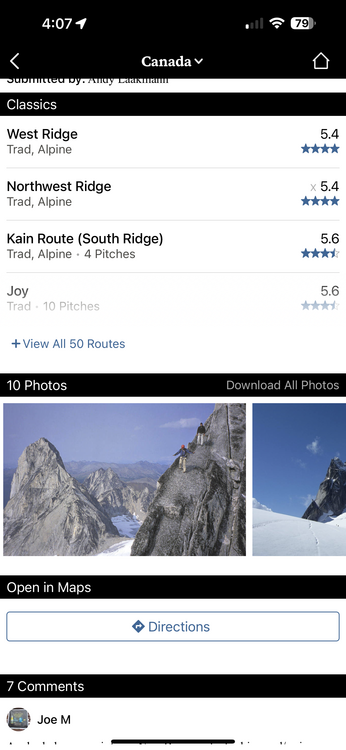 |


