|
|
Nick Faust
·
Jul 1, 2011
·
Sandy, UT
· Joined Jun 2007
· Points: 15
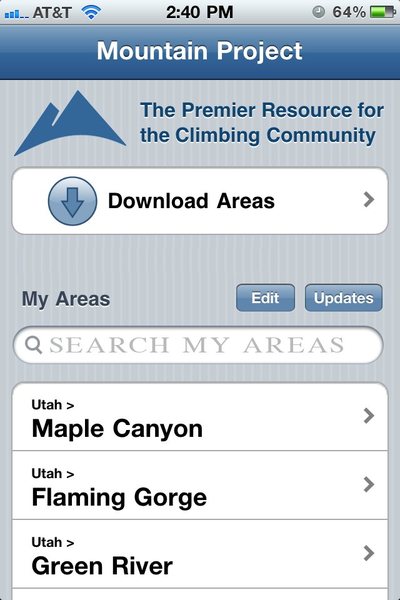
I might suggest putting the "Search My Areas" next to "My Areas" and either move the "Download Areas" to the top or bottom of the main menu. At least the way my brain works, I thought I was searching for new areas to download, instead of searching for what I had already downloaded.
Overkill I know, but I had a minute and did the switch in photoshop for illustration. I also moved the search under "My Areas".
|
|
|
Nick Wilder
 ·
Jul 1, 2011
·
Boulder, CO
· Joined Jan 2005
· Points: 4,098
·
Jul 1, 2011
·
Boulder, CO
· Joined Jan 2005
· Points: 4,098
Nick Faust wrote:I might suggest putting the "Search My Areas" next to "My Areas" and either move the "Download Areas" to the top or bottom of the main menu. At least the way my brain works, I thought I was searching for new areas to download, instead of searching for what I had already downloaded. Overkill I know, but I had a minute and did the switch in photoshop for illustration. I also moved the search under "My Areas". Now you've got me wondering if the "Download Areas" button should be below everything? Once you've installed a bunch of areas, you won't use that button much, so perhaps it doesn't deserve the top placement...
|
|
|
Nick Faust
·
Jul 1, 2011
·
Sandy, UT
· Joined Jun 2007
· Points: 15
^^ Bottom would make the most amount of sense I think. Also, in preparation for the release of iOS 5 "cut the cord" concept, it might be useful to place a link to the website in the app.
|
|
|
saxfiend
·
Jul 1, 2011
·
Decatur, GA
· Joined Nov 2006
· Points: 4,221
Nick Wilder wrote: Now you've got me wondering if the "Download Areas" button should be below everything? Once you've installed a bunch of areas, you won't use that button much, so perhaps it doesn't deserve the top placement... I think that's a good idea. Alternatively, you could make the "download" link a small button alongside the "edit" and "updates" buttons.
JL
|
|
|
l.m.
·
Jul 1, 2011
·
Salt Lake City, UT
· Joined Jan 2011
· Points: 0
The app is great. I'm really excited about it. Here are my suggestions (all have already been mentioned):
1) I want to be able to search by route type. (Trad/Sport/Boulder/etc.) It's kind of tiresome to have to click on each route.
2) A to-do list separated by area. For example, this weekend I'm climbing in Logan and Ogden, UT and I want to be able to create a list for each area.
3) Be able to exit the app and have the areas continue to download.
4) Integrate with google maps app.
|
|
|
Chris Plesko
·
Jul 1, 2011
·
Westminster, CO
· Joined Oct 2007
· Points: 485
Finally got it loaded up with Boulder area today. Can't wait to take it out!
|
|
|
l.m.
·
Jul 1, 2011
·
Salt Lake City, UT
· Joined Jan 2011
· Points: 0
This would be cool -- if, after you are in the area, you could sort the climbs from left to right/right to left.
|
|
|
Matt Reeser
·
Jul 2, 2011
·
Unknown Hometown
· Joined Sep 2009
· Points: 316
l.m. wrote:This would be cool -- if, after you are in the area, you could sort the climbs from left to right/right to left. I think this is a great idea. It would help with route finding.
|
|
|
Amos Patrick
·
Jul 2, 2011
·
Estes Park
· Joined Dec 2001
· Points: 337
Wow, really nice. I like how clean it is and easy to navigate. I agree with the above comments about grouping the search with My Areas section and moving the Download Areas to the bottom of the list. A couple suggestions that you may want to consider.
-It seems that you could really leverage the GPS to mark and find the start of the routes. Once you get the location of routes you could start to do the augmented reality stuff with the camera (like Yelp).
-I would personally like to have the routes/areas listed above the area "Description" and "Getting There" fields. I only read those sections once but I dig into the routes very often.
-I would like to have a list of "Favorite Crags" or Bookmarks where I can mark a crag (or any page) and it will be listed as another list on the home screen. For example, I may be planning on climbing a lot up on Hallet Peak in RMNP. Currently I have to navigate Alpine Rock -> RMNP - Rock -> Hallet Peak -> All Routes. Maybe in the title bar of each window you could put a plus button (similar to adding a bookmark in Safari) next to the home button that will add the current page to the home screen. This way I could have the All Routes page for Hallet on my home screen and get to it with one click.
-I am not sure I agree with excluding uploading photos from an iPhone. iPhone photos are not too bad and they would enable users to easily add photos of important route landmarks such as what the start of the route looks like and where you should veer left.
|
|
|
Daniel_L
·
Jul 3, 2011
·
Orem, UT
· Joined Dec 2010
· Points: 10
After spending two days out climbing using the app in a couple of different areas in the Wasatch I just wanted to check in and give an update. I agree with the comments others have made about having a tick list available. Really overall the app is awesome, really clean and easy to use. You did a great job with this thing. If you would just add a way to sort or view by type of route this would be the most awesome thing ever made.
|
|
|
Nick Faust
·
Jul 3, 2011
·
Sandy, UT
· Joined Jun 2007
· Points: 15
I was thinking how cool it would be to have all the downloaded areas (potentially others that are not downloaded when cell signal is available) show up on the same map screen. Then be able to to zoom into the next level of detail, and so on. For example, I open the map and see all the primary areas such as Maple Canyon or Uinta Mountains. Still in the map, I zoom in on Maple Canyon, and then all the subareas show up, such as Maple Canyon Road. I zoom in further and see the sub-sub areas such as School Room. This would be great for the spatially minded.
|
|
|
Jeremy Bauman
·
Jul 3, 2011
·
Lakewood, CO
· Joined Feb 2009
· Points: 1,107
Nick Faust wrote:I was thinking how cool it would be to have all the downloaded areas (potentially others that are not downloaded when cell signal is available) show up on the same map screen. Then be able to to zoom into the next level of detail, and so on. For example, I open the map and see all the primary areas such as Maple Canyon or Uinta Mountains. Still in the map, I zoom in on Maple Canyon, and then all the subareas show up, such as Maple Canyon Road. I zoom in further and see the sub-sub areas such as School Room. This would be great for the spatially minded. This would be awesome
|
|
|
Nick Faust
·
Jul 4, 2011
·
Sandy, UT
· Joined Jun 2007
· Points: 15
Loving this app! I did think of another possible improvement late last night: Integrate the compass feature into the map as an option so that the phone will be oriented with the direction you are facing.
Again, great work!!!
|
|
|
Matt Reeser
·
Jul 4, 2011
·
Unknown Hometown
· Joined Sep 2009
· Points: 316
I AM USING A 3RD GENERATION IPOD TOUCH
Here are a few notes I made while climbing the past few days using only the mp app. I loved using this app, it was great. I was able to go to an area where there was no guide in print, and climb. I had never been to that area before either so from a practical view it was superb.
Everything loaded super fast and it was easy and helpful to use.
If the first ascent notes are long, you cannot view the whole thing. Should have a "tap to see more"
I think it would be GREAT to be able to add your own notes to a particular climb and area. There were a few times when I wanted to note when this side got sun and when it got shade.
Adding your own photos would be helpful also.
Sorting climbs left to right. I remember reading that you guys delegated this to area admins correct? Hopefully all of the areas will have this feature before you guys launch.
The low resolution pictures were useless to me. I would like to see an option to download either ALL the low res or ALL the high res pictures when downloading an area. Downloading the hi-res pictures one by one is...tough.
If you hit jump to end the show more and show last move to the top of the list. Seems weird. Shouldn't it still be on the bottom?
If you hit the show last it will sometimes, almost 50/50 only show you the last route. That should not happen right?
I hope this helps.
|
|
|
Jeremy K
·
Jul 5, 2011
·
Evergreen, CO
· Joined Nov 2007
· Points: 0
dameeser wrote:The low resolution pictures were useless to me. I would like to see an option to download either ALL the low res or ALL the high res pictures when downloading an area. Downloading the hi-res pictures one by one is...tough. A bit more granularity when downloading areas would compliment this feature. For instance, if I am heading to the slab in the flatirons for the first time, I need the area/route info and high res pictures for that crag. I don't need the info for all of Boulder. Ideally I could download all of Boulder or a specific crag, depending on my needs.
|
|
|
Andy Laakmann
·
Jul 5, 2011
·
Bend, OR
· Joined Jan 2001
· Points: 1,990
Our plan (hope!) is to offer a "Download All Photos" button for any area.
Obviously for HUGE areas this will be prevented as it would take way too long, but for your typical crag/area you'll hopefully be able to download all the hires photos with one button.
|
|
|
Rigggs24
·
Jul 5, 2011
·
Denver, CO
· Joined Oct 2009
· Points: 45
So i havent used this app out at the crag yet but I have played around with it on and offline a bit and plan on using it outside this weekend. Thought I would give my initial thoughts on the app. I think overall its a great app and it is well organized. I agree with some other people here that a useful add would be to have an option to download all pictures for a particular crag. Some other aspects that I am not sure others have stated or at least not to the extent that I am thinking, involve the integration with the GPS and map. I think it would be very useful to have an option to tag the base of a route with a GPS point and further be able to give a thumbs up/down to an already existing point to help provide the best location data. Also, in the pages describing the approaches to a crag, I think it would be useful to be able to mark key points along approach trails, such as the trailhead and any forks in the trail. And then have the option to view approach trail GPS points and crag GPS points on a map. I would leave individual route points off of the larger map since it would probably get busy. I realize Mountain Proj is not a mapping software but I think this would be a really cool and useful addition. Only other suggestion I would have is to separate areas like "Boudler" into smaller downloads by crag. That one took me awhile to download and I really only wanted it for Eldo. Thanks for putting this app together. I will use it quite often and would definitely pay a fee for its use.
|
|
|
RyanO
·
Jul 5, 2011
·
sunshine
· Joined Jun 2009
· Points: 145
Great work on the app, thanks for the opportunity to beta test :) Four things:
1. If you look at South platte/devils head/Arena there are four routes listed, and also four classic routes. But when you look at the routes, one of them has two stars, one has 3.5 and the other two have four. I thought this would only be 2 classics.
Now that I look, it's the same way on the website. So how are "classics" determined? I thought it was 4 stars/devils.
2. Grand Teton National Park came with the app, not sure if that was intentional. I'll not be making it up there in a while so I had to remove it.
3. The areas that you download show up in the order downloaded (I think), or maybe the order in which they finished downloading. Anyway, I should have downloaded all of colorado at once, but instead I picked out a few - golden, south platte, boulder, alpine rock, gunnison, etc.. Now I have a big old list of stuff, mostly in CO, and it would be nice to have them organized into a CO super category so I don't have to do so much scrolling around to find the places in Wyoming.
4. This might be more effort than it's worth, but I really miss the ability to click on the hyperlinks in places like this:
Colorado > South Platte > Devil's Head > The Arena
- * I'm on the ticking and commenting side of the debate. I also don't think it would be a big deal to allow pictures, the iphone cameras are pretty good. Maybe a review process on pictures would work (e.g. 3 strikes are you're out?)
Thanks again for all of this hard work, the app looks and works great!
|
|
|
RyanO
·
Jul 5, 2011
·
sunshine
· Joined Jun 2009
· Points: 145
One more thing: in itunes the mp app shows up with "unknown genre". Can you add categories, because I think this one deserves its own :) (yea, people, it's that good)
|
|
|
Merlin
·
Jul 5, 2011
·
Grand Junction
· Joined Mar 2006
· Points: 10
Thanks for this. It coincides perfectly with my move back to Colorado.
|

 Continue with onX Maps
 Sign in with Facebook