|
|
Trad Princess
·
Mar 29, 2018
·
Not That Into Climbing
· Joined Jan 2012
· Points: 1,175
I can't seem to upload pics to threads, or add them with URL, etc. Various browsers and computers. Says something about Code3 Am I the only one?
|
|
|
amarius
·
Mar 30, 2018
·
Nowhere, OK
· Joined Feb 2012
· Points: 20
Just tried inserting image via url, got "Image could not be saved. Code 3"
|
|
|
Tim Stich
·
Mar 30, 2018
·
Colorado Springs, Colorado
· Joined Jan 2001
· Points: 1,516
(That look when you made some sweet Photoshop burns and then the image tag don't work)
|
|
|
Nick Wilder
 ·
Mar 30, 2018
·
Boulder, CO
· Joined Jan 2005
· Points: 4,098
·
Mar 30, 2018
·
Boulder, CO
· Joined Jan 2005
· Points: 4,098
|
|
|
Trad Princess
·
Mar 30, 2018
·
Not That Into Climbing
· Joined Jan 2012
· Points: 1,175
Tim Stich wrote:
(That look when you made some sweet Photoshop burns and then the image tag don't work)
Obsessed! #sadinCOsprings
|
|
|
Trad Princess
·
Apr 25, 2018
·
Not That Into Climbing
· Joined Jan 2012
· Points: 1,175
Are we able to post .gif files that move on MP? I would swear we could, but now I'm getting a similar error message
|
|
|
Aleks Zebastian
·
Apr 25, 2018
·
Boulder, CO
· Joined Jul 2014
· Points: 175
Locals Only wrote:I can't seem to upload pics to threads, or add them with URL, etc. Various browsers and computers. Says something about Code3 Am I the only one? climbing friend, I do believe there is policy against unsolicited "dick pic." probably it is that in which you are violation of?
|
|
|
Bill Kirby
·
Apr 25, 2018
·
Keene New York
· Joined Jul 2012
· Points: 480
Tim Stich wrote:
(That look when you made some sweet Photoshop burns and then the image tag don't work). climbing friend,
I do believe there is policy against unsolicited "dick pic." probably it is that in which you are violation of?
I knew it Tim!.. or should I say Alex’s.. You can’t talk smack to Adam then change into character, talk more smack in the same thread and think we won’t notice :)
|
|
|
Trad Princess
·
Apr 25, 2018
·
Not That Into Climbing
· Joined Jan 2012
· Points: 1,175
Tried many different .gif files from different sources. Still no luck.
|
|
|
Trad Princess
·
Apr 26, 2018
·
Not That Into Climbing
· Joined Jan 2012
· Points: 1,175
Can anyone confirm or deny that .gif files are able to be uploaded as images?
|
|
|
Nick Wilder
·
Apr 26, 2018
·
Boulder, CO
· Joined Jan 2005
· Points: 4,098
jpegs and png files are the only types allowed in the forums. So animated gifs won't work.
|
|
|
M Mobley
·
Apr 26, 2018
·
Bar Harbor, ME
· Joined Mar 2006
· Points: 911
Nick Wilder wrote: jpegs and png files are the only types allowed in the forums. So animated gifs won't work. boooooo!
|
|
|
Nick Wilder
·
Apr 26, 2018
·
Boulder, CO
· Joined Jan 2005
· Points: 4,098
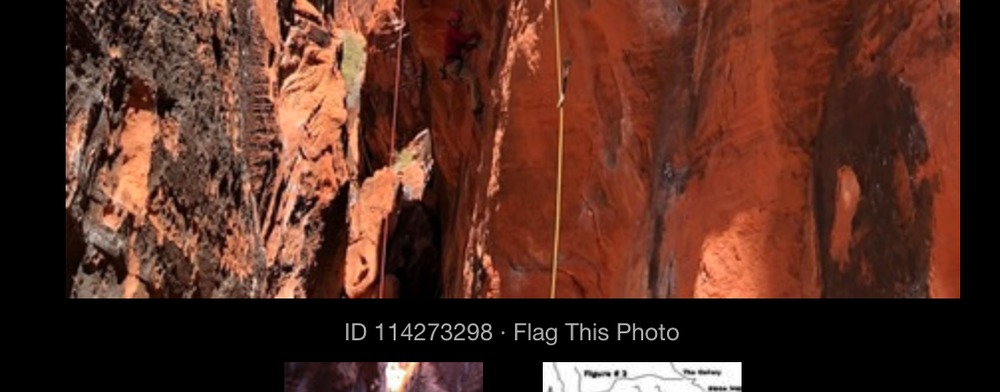
I'm not exactly sure what you mean s.price, but if you're talking about adding a photo (that's already on the site) to a forum message, the shortcut is to get the photo ID from the url (it's also specified below the photo itself) and stick it in double square brackets, like this:
{{114273298}} (but square brackets, not squiggly ones). You can actually link to anything on MP this way (any ID works).
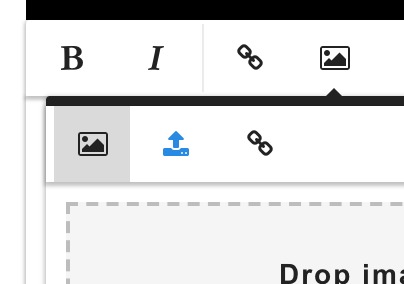
If you don't remember this trick, you can click the "photo" icon in the toolbar, which has three tabs. Clicking the left one will get you a prompt for the photo ID.
1. To insert an image 2. The left button will prompt you for a photo ID. The middle is for uploading one. The right is for linking to an image file. 3. The photo ID, below the image. It's also in the URL.
|
|
|
Zach Joing
·
Feb 7, 2019
·
Boulder, CO
· Joined Jul 2011
· Points: 85
I'm trying to drag and drop a Jpg file of a pair of boots. A pop up comes up saying "image could not be Saved. Code 5" Is the file too large or something?
|
|
|
Suburban Roadside
·
Feb 7, 2019
·
Abovetraffic on Hudson
· Joined Apr 2014
· Points: 2,419
|
|
|
Suburban Roadside
·
Feb 7, 2019
·
Abovetraffic on Hudson
· Joined Apr 2014
· Points: 2,419
116516105, put 2 square bracket per side , on either side of the 9 number picture code, [ 2[ " __&__"1],2]" around the numbers, [x2 116516105, ,.as done here,., 116516105 ]x2, = , ...
Inorder to have a code number you have to add a properly sized jpg/png from your computer. this is accomplished by clicking on the picture icon, as described in Nicks post.
|

 Continue with onX Maps
 Sign in with Facebook